Dynamics 365 in Copilot: The Ignite 2026 Skill D365 Pros Need
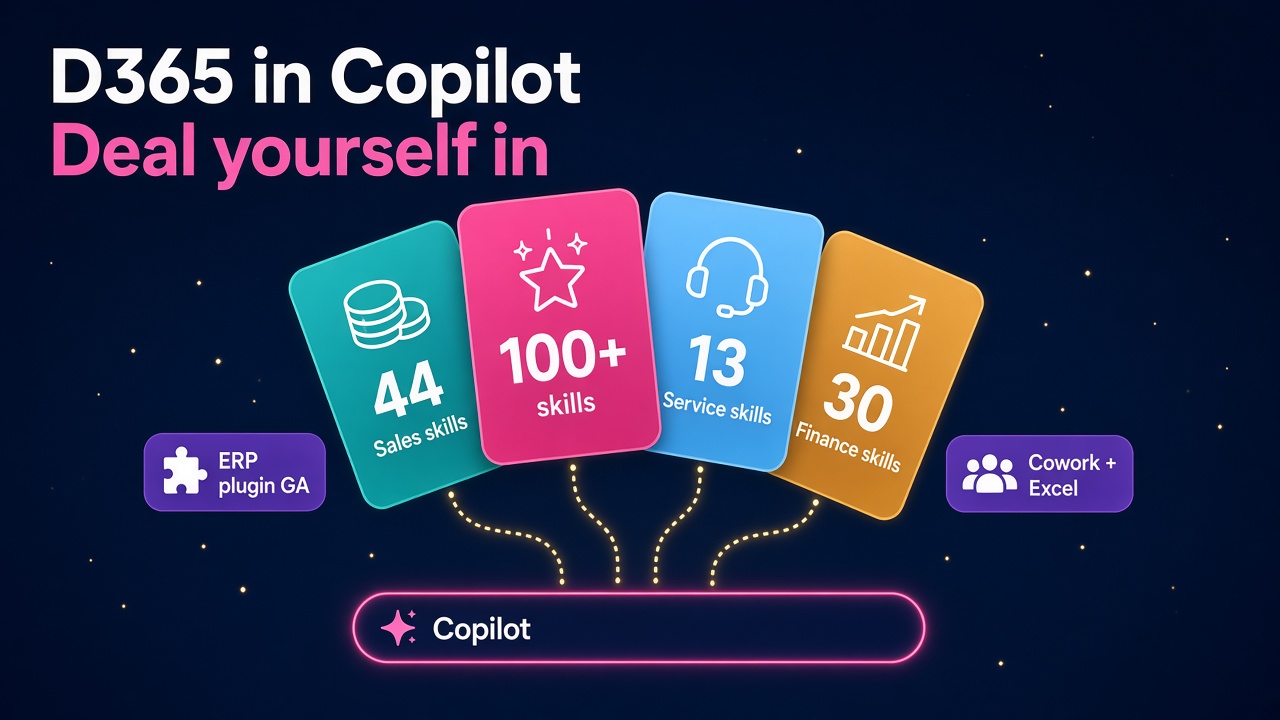
Ignite 2026 put Dynamics 365 inside Copilot with 100+ prebuilt skills for sales, service and finance. Here is what changes for D365 pros and how to get ahead.
Microsoft Ignite 2026 kicked off on 17 November, and for anyone who earns a living from Dynamics 365 the headline is a big one. Microsoft announced Dynamics 365 in Copilot, with updated plugins for Sales, Service and Finance and Operations that bring more than 100 prebuilt skills straight into the Microsoft Copilot app.
In plain English, a lot of everyday D365 work is about to start somewhere other than the D365 screen. Sellers will plan accounts and prep meetings from Copilot. Service teams will triage cases from Copilot. Finance teams will run month-end work in Copilot and Excel, with the ERP doing the heavy lifting underneath.
I think this is fantastic news for D365 professionals, as long as you move early. Here is what was announced, what it means for your career, and what I would do about it this week.
What did Microsoft actually announce?
The detail is spread across the Ignite 2026 Book of News and Jared Spataro's Copilot at Ignite post. The D365 parts that matter most:
- Dynamics 365 Sales plugin, generally available. Sellers can build account plans, prepare for customer meetings, catch up on deals and prioritise pipeline inside Copilot. New deal insights track progress against the quarterly forecast, map decision makers and engagement gaps, and flag deals at risk. It can also build and refresh PowerPoint decks.
- Dynamics 365 ERP apps plugin, generally available. This brings finance and operations context and actions into Copilot Cowork and Excel. Microsoft's example is Source to Pay, where a sourcing lead works through purchase requisitions, requests for quotes and purchase orders without leaving Copilot.
- A skills count worth noting. Microsoft says there are 44 sales skills, 13 customer service skills and 30 prebuilt finance skills, with more than 100 across the Dynamics 365 plugins.
- Human review stays in the loop. For service, case updates are "held for review before anything is committed", and for sales, follow-ups and CRM updates are drafted for review.
- Dynamics 365 Activate expands to ERP. Activate now adds SAP ECC discovery, requirements analysis, configuration and data migration, rolling out over the coming weeks, and the Salesforce migration experience is now generally available.
- Agent 365 gets serious about cost. New Agent 365 Cost Management and Business Analytics let IT track spend across users, agents and models, set limits and alerts, and measure value in work completed rather than tokens.
Microsoft also described Dynamics 365 as its "agentic system of record", integrated with Work IQ and Agent 365. That phrase is the real story.
Why does "system of record" matter so much?
For twenty years, the D365 job has been built around screens. Forms, views, workspaces, dashboards. Consultants designed them, developers extended them, trainers taught people to click through them.
Microsoft is now saying, fairly openly, that the screen is becoming optional for a lot of users. The data, the rules, the security and the business logic stay in Dynamics 365. The front door moves to Copilot, where a seller or an accounts payable clerk asks for what they need and a skill does the work against D365.
That is not the end of the D365 consultant. It is the opposite. Somebody has to make sure the data underneath is clean enough for a skill to trust, that security roles stop an agent seeing what it shouldn't, that the approval steps are in the right places, and that the business actually changes how it works. Those are all D365 skills. They are just being pointed at a new audience.
Who wins from Dynamics 365 in Copilot?
I am quite certain the people who do best out of this will be the ones who can stand in both worlds: deep in the D365 data model and comfortable in Copilot, Cowork and agents. A few roles stand out.
Functional CRM consultants
The Sales plugin is GA today, which means customers will be asking their partners about it by Friday. Consultants who can explain which of the 44 sales skills fit a client's sales process, what data quality each one needs, and how deal insights line up with the client's forecast categories will be busy. We wrote about the Sales Agent semantic model last week, and this is the natural next step from it.
Finance and operations consultants
The ERP apps plugin landing in Excel is a big deal. Finance people live in Excel, and many have never loved the D365 Finance client. If month-end tasks, reconciliations and purchasing work can now start in a workbook or a Cowork task, adoption could jump. F&O consultants who understand both the finance process and how skills call into the ERP will be in real demand. It sits neatly alongside the ERP MCP server and the Account Reconciliation Agent.
Power Platform and Copilot Studio people
The prebuilt skills are the starting point. Customers will want their own, tuned to their processes, approvals and terminology. That is classic Copilot Studio and Dataverse work, plus governance, and it is where makers and solution architects earn their keep.
Admins and security specialists
Microsoft's Agent 365 update adds controls for agent tools, including MCP servers, plugins and skills, through Entra Agent ID. Every new skill in Copilot is another thing somebody needs to approve, monitor and govern. If you are a D365 or Power Platform admin, this is your moment to become the person who owns agent governance, not the person who finds out about it afterwards.
Migration specialists
Activate's SAP ECC discovery and the now GA Salesforce migration experience mean more migration projects, run faster, with agents doing the first pass and people validating. Microsoft is clear that project teams "review and validate every recommendation", which is exactly where experienced consultants come in. We covered the CRM side when Activate first launched; the ERP side opens up a far bigger pool of SAP customers.
What about the cost question?
This is the bit I would not skip. Microsoft cited research that corporate AI spending doubled in a year and that more than 80% of it now sits outside the enterprise IT budget. That is a polite way of saying a lot of companies have no idea what they are spending on AI.
Agent 365 Cost Management lets leaders set spending policies, limits and alerts, and choose which models are available. Business Analytics tries to measure value in hours of work supported rather than raw tokens.
For D365 professionals this is an opportunity. Clients will want someone to tell them which skills are worth switching on, what they will cost and how to prove the return. If you can put a sensible business case in front of a CFO, you become far more valuable than the person who can only configure the feature. Our piece on Copilot Credits is a good primer.
What should you be realistic about?
I am an optimist, but a realistic one. A few honest cautions:
- GA does not mean every tenant is ready. Skills are only as good as the data behind them. A CRM full of stale opportunities will produce confident but wrong deal insights.
- Licensing will take time to settle. Expect questions about which Copilot, Dynamics 365 and Agent 365 entitlements cover what. Read the official docs rather than LinkedIn hot takes.
- Some pieces are still rolling out. The Activate ERP capabilities roll out over the coming weeks, Salesforce in Copilot is in preview, and Copilot Code is due to be generally available in December.
- Change management is the hard part. Moving people from "I open D365" to "I ask Copilot" is a habit change, and habits are stubborn.
None of that is a reason to wait. It is a reason to get skilled up so you can help clients through it properly.
How do you get ahead of this?
Here is a practical list you can work through this week and next:
- Read the source material. Start with the Book of News and the Copilot at Ignite post. Then watch the Dynamics 365 Ignite sessions on demand as they appear.
- Get hands-on in a sandbox. If your company or partner has a Copilot-enabled tenant, connect the Sales or ERP apps plugin and try ten real tasks. Note where it shines and where the data lets it down.
- Map skills to a real process. Take one process you know well, such as Source to Pay or lead to opportunity, and write down which steps a skill could do and which still need a person.
- Learn the governance layer. Spend an hour on Agent 365, Entra Agent ID and how plugins and skills are approved in your tenant.
- Build one custom skill or agent. Use Copilot Studio to extend a prebuilt skill with your own business rules. Even a small one gives you a story for your next interview.
- Update your CV and profile. Add "Dynamics 365 in Copilot", "Copilot Cowork" and "Agent 365" where you genuinely have the experience. Recruiters and hiring managers will start searching for these terms quickly.
- Talk to your clients or managers. Ask them what they think of the Ignite news. The conversation itself positions you as the person who is across it.
What to do next
If you are a D365 professional, browse the latest Dynamics 365 jobs and check the D365 salary data to see where Copilot and agent skills are already moving pay. If you are a consultant looking for project work, make sure your profile is listed in our consultants directory.
If you are hiring, now is the time to find people who can stand in both D365 and Copilot. Post a role on our employers page, and explore the products and vendors building on top of Dynamics 365 in Copilot.
It is a great week to be in the Dynamics world. Get stuck in.