Copilot Credits: The Agent Cost Skill D365 Pros Need Now
Copilot Studio now shows credits per workflow run and step, and cost controls move to the M365 admin center. Why agent cost skills now matter for D365 pros.
If you build or run agents on the Dynamics 365 and Power Platform stack, there is a quiet change this month that I think matters more than most of the shiny launches. Microsoft has started putting the price tag right next to the work.
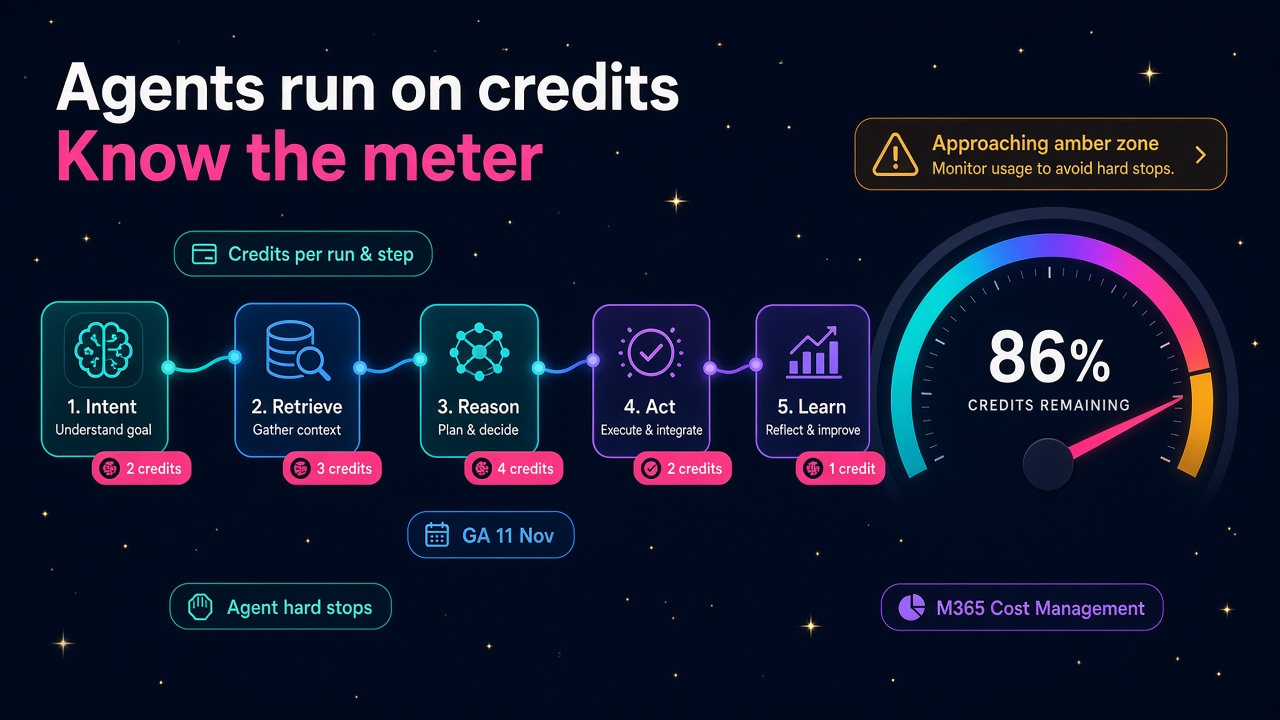
On 11 November, Copilot Studio made credit visibility in workflows generally available. And by 20 November, Copilot Studio cost controls are expanding into Cost Management in the Microsoft 365 admin center. Put those together and you get a very clear signal: agents are moving from "cool pilot" to "line item in the budget", and someone on every project needs to know how to read the meter.
That someone should be you. Here's why, and how to get good at it quickly.
What actually shipped?
Let me stick to what Microsoft has published.
Credit visibility in workflow runs (GA 11 November)
According to Microsoft 365 message centre post MC1552503, makers can now see how many Copilot Credits each workflow run consumes, directly from the workflow designer in Copilot Studio. Microsoft lists three improvements:
- Run details: a credits pill shows the estimated credits per run and per step.
- Monitor tab: you can view credits used across runs to understand and predict costs.
- Capacity awareness: a warning banner appears when credit limits are approaching or have been reached, and test runs are blocked when credits are exhausted.
Microsoft's own framing is that this lets makers "predict and control the cost of automation before scaling it to production" and quickly spot which steps drive consumption. That's exactly the conversation clients have been struggling to have.
Cost controls move into the Microsoft 365 admin center (by 20 November)
Message centre post MC1530368, published on 29 October, says Copilot Studio cost controls are expanding to the Cost Management section of the Microsoft 365 admin center, reaching general availability by 20 November 2026. A few details are worth knowing properly, because clients will get them wrong:
- Spending policies can be applied to a supported environment or to an individual agent, or across supported environments.
- It is not switched on automatically. Moving cost-policy management is optional and done by an administrator, environment by environment.
- Once an environment is moved, the Microsoft 365 admin center policy becomes the active cost control, and new usage for that environment shows up there rather than in the Power Platform admin center. Older usage stays where it was.
- Other Copilot Studio administration stays in the Power Platform admin center.
- Cost Management and the agent registry will show costs in the organisation's local currency.
So for a while, many tenants will have some environments governed in one admin centre and some in another. If you've ever untangled a licensing mess for a client, you can already see the consulting work forming.
Why is cost suddenly a skill?
Because agents don't cost a flat fee per user any more, and the bill depends on how they're built.
Microsoft's billing rates page for the standard harness spells it out. A classic answer is 1 Copilot Credit, a generative answer is 2, an agent action is 5, and tenant graph grounding for messages is 10. Microsoft's own example is an agent grounded in the tenant graph using 12 credits to answer a single complex prompt. Agent flow actions are billed at 13 credits per 100 actions, and content processing tools at 8 credits per page.
Credits come in capacity packs of 25,000 per month (Copilot Studio is listed at $200 on Microsoft's pricing page), or through pay-as-you-go billing via an Azure subscription, or a mix where prepaid credits are used first and overage flows to pay-as-you-go.
There's also a nuance that trips people up. Employee-facing usage is generally included for users with a Microsoft 365 Copilot licence when the agent runs as that user. But agent flows on triggers other than "When an agent calls the flow" consume credits at the standard rate. And Microsoft's governance guidance for the newer Microsoft Copilot harness is blunt: those agents consume credits while makers build, preview and evaluate them, so an exploration environment can rack up usage even if nothing is ever published.
In other words, two agents that do the same job can have very different running costs depending on design choices. That's not a finance problem. That's a design problem, and it lands on the people who build things.
The upside: this is good news for D365 people
I'm genuinely optimistic about this. For the last couple of years, a lot of agent projects have stalled at the same point: the pilot works, everyone's excited, and then the CFO asks what it will cost at scale and nobody can answer with confidence. The project goes quiet.
Visible, per-step costs fix that. When you can show a client that their invoice-matching workflow costs a predictable number of credits per run, and that you cut it by moving one step from a premium tool to a cheaper one, you've turned a science experiment into a business case. Business cases get funded. Funded projects need consultants, admins and developers.
It also rewards the skills Dynamics people already have. We've spent years thinking about licensing, environments, capacity and process efficiency. Agent cost management is the same muscle applied to a new meter.
What roles will this change?
Functional consultants
You'll increasingly be asked "what will this cost to run?" in the design workshop, not after go-live. Being able to estimate credits per process, using Microsoft's Copilot Studio agent usage estimator and the billing rates table, will make your designs easier to approve. I'd expect it to show up in solution design documents and statements of work fairly soon.
Power Platform and Copilot Studio developers
The credits pill per step is effectively a profiler. Good developers will use it the way they use performance tools today: find the expensive step, redesign it, measure again. Keeping knowledge sources focused, not reaching for reasoning-heavy models when a simple answer will do, and avoiding needless tool calls are now cost decisions as well as quality decisions.
Admins and CoE leads
Microsoft's governance article lays out a tidy baseline: discover agents and environments, classify each environment (exploration and prototyping, test and validation, or funded production), review controls, apply agent-level limits, then repeat and automate. It describes four layers of control: tenant, environment, agent (monthly limit, notification threshold, hard stop and explicit stop state) and an operating process with cost owners, alert triage and exception approval. If you run a Centre of Excellence, that's your next quarter's backlog written for you.
Partners and practice leads
There's a productised service hiding in here. An "agent cost health check" that inventories environments, sets sensible limits, decides whether to move environments to Microsoft 365 Cost Management, and hands over a simple monthly report is a very easy thing to sell to existing clients. Managed service teams will want it as a standing line item.
Practical things you can do this week
None of this needs a big course. Here's what I'd do:
- Open a workflow in Copilot Studio and look at the credits pill on each step. Run it a few times and check the Monitor tab. Get a feel for what normal looks like.
- Read the billing rates table properly. Learn the difference between a generative answer (2 credits), an agent action (5) and tenant graph grounding (10). Know it well enough to explain it on a whiteboard.
- Try the Copilot Studio agent usage estimator on a real process from a current project. Build a rough monthly credit forecast and sanity-check it against the run data.
- Map a client's environments into the three classifications Microsoft suggests. You'll almost certainly find a forgotten sandbox drawing from shared capacity.
- Set an agent-level monthly limit and a notification threshold in a test environment so you've actually done it before a client asks.
- Read MC1530368 in full and write yourself a one-page note on what changes when an environment moves to Microsoft 365 Cost Management. Remember it's optional and per environment.
- Add a "running cost" section to your next design document. Even a rough one sets you apart.
How to talk about it in interviews and pitches
If you're job hunting, this is a great topic to bring up. Hiring managers at partners and end users are all wrestling with agent costs right now. A sentence like "I design agents with a credit budget per run, measure each step in the Monitor tab and set agent-level hard stops before go-live" tells them you think like an owner, not just a builder.
For contractors, cost governance is also a natural extension to an existing engagement. Once a client's agents are live, someone has to watch the meter, tune the expensive steps and handle exception requests. That's ongoing work, and it's the kind clients are happy to pay for because it saves them money.
My take
The exciting part of the agent era isn't just that software can now do real work. It's that the work is becoming measurable down to the step, which means it can be managed, improved and scaled with confidence. The people who can connect "this step costs X" to "this process saves Y" are going to be very busy over the next couple of years.
It's a small feature on paper. I think it marks the point where agents grow up, and that's great news for anyone in the Dynamics world willing to learn the meter.
What to do next
- See which employers are hiring for Copilot Studio and Power Platform skills on our jobs board.
- Check what these skills are worth in your market on the salaries page.
- If you're a partner building an agent governance offer, list your practice on the vendors directory and showcase it on products.
- Need help right now? Browse experienced consultants, or post a role for employers.
Sources: Microsoft 365 message centre posts MC1552503 and MC1530368; Microsoft Learn, "Billing rates and management - Microsoft Copilot Studio", "Govern Copilot Credit consumption for agents powered by the Microsoft Copilot harness" and "Use Capacity Packs vs Pay-as-you-go Billing for Microsoft Copilot Chat"; Microsoft Copilot Studio pricing page.