Sales Agent Semantic Model: The CRM Skill D365 Pros Need
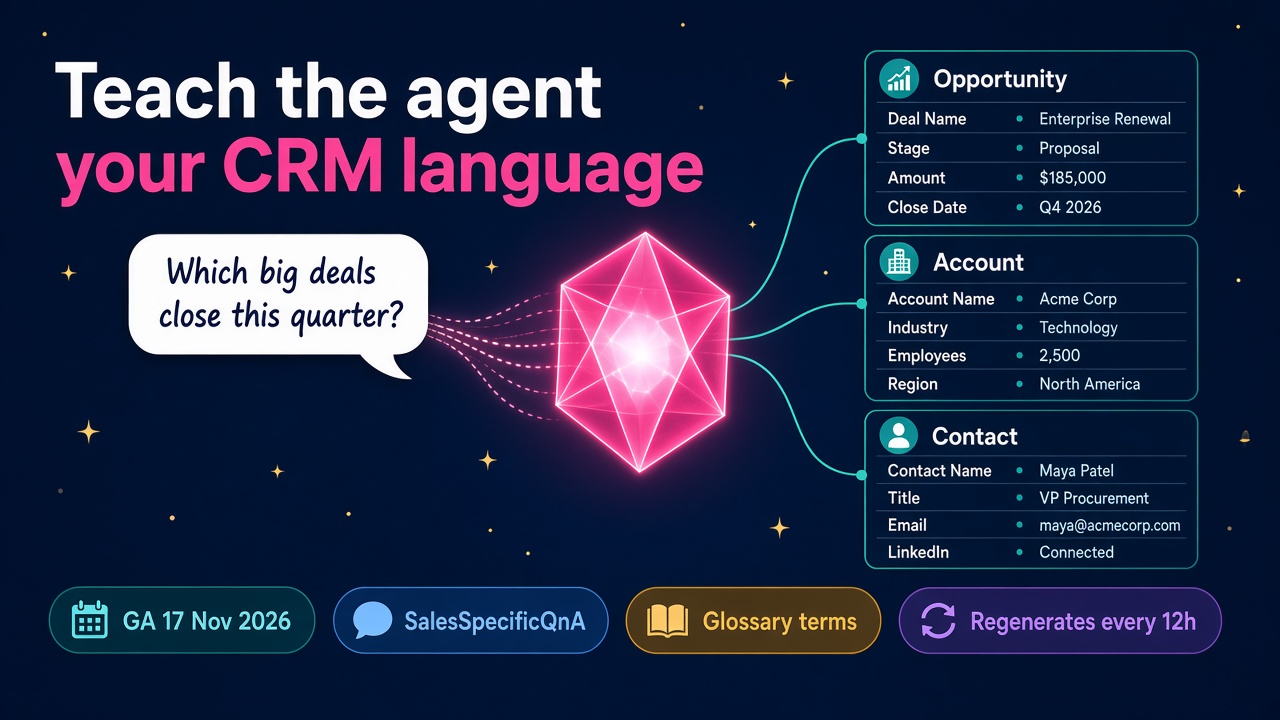
Sales Agent semantic model support goes GA on 17 November. How it works, the four levers to tune, and why it is a new CRM skill for D365 consultants.
Ask any seller what a "big deal" is and you'll get a number. Ask the CRM and you'll get a column called something like new_estrevenue_adj, sitting on a custom table nobody has documented since 2019. That gap between how people talk and how Dynamics 365 is built has quietly been the biggest reason AI answers in CRM feel a bit off.
Microsoft is closing it. According to Microsoft 365 message centre post MC1540293, added on 5 November, semantic model support for Sales Agent in Microsoft 365 Copilot reaches general availability on 17 November 2026. It's a small-sounding line item. I think it creates a very real, very billable skill for D365 Sales consultants, and the people who learn it in the next month will be the ones clients call first.
What is the Sales Agent semantic model?
In Microsoft's words, the semantic model "helps Sales agent understand what your data means by using signals from your CRM environment, such as relationships, views, and forms." The message centre post adds that admins can fine-tune which CRM tables, relationships, views and glossary terms Sales Agent uses when grounding its answers, and that this helps most "in environments with custom CRM schemas and complex data relationships."
That last bit is basically every Dynamics 365 Sales environment I've ever seen.
Here's what the Microsoft Learn setup guide and the fine-tuning guide tell us about how it works:
- It's generated for you. For Dynamics 365, the model is built automatically once you enable the setting. For Salesforce it waits for the next metadata cache refresh.
- It needs Work IQ switched on in the environment, and Dataverse Intelligence enabled. The first sync can take up to two hours.
- It has a name you'll see a lot:
SalesSpecificQnA. Sales Agent and Copilot in Dynamics 365 Sales both use it, so a change you make applies to both. - It regenerates every 12 hours, or you can trigger a manual regeneration when you've just changed views or column descriptions.
- You can't edit computed signals directly. To correct what the system has inferred, you add a glossary definition, or switch the signal or table off.
Existing permissions still apply, which is the bit your security team will want to hear first.
Why this matters more than it sounds
For the past couple of years, a lot of AI-in-CRM projects have hit the same wall. The demo works beautifully on a clean trial environment. Then you point it at a real customer's org with 400 custom columns, three different "status" fields and a table called "Opportunity Extension (Do Not Use)", and the answers get vague.
The semantic model is Microsoft admitting, sensibly, that metadata alone isn't enough. The Learn guide says it plainly: Sales Agent relies on CRM metadata to interpret requests, and "because this metadata is often incomplete," you can supply extra guidance like synonyms and glossary terms.
Put that alongside the other big Sales news from the last fortnight. The Dynamics 365 CX MCP Server for Sales went generally available on 29 October with 59 governed tools across leads, opportunities, accounts, quotes and orders. And on 3 November Microsoft published enterprise setup guidance for the Sales Development Agent, which works with Dynamics 365 Sales through MCP.
So agents can now act on CRM data and prospect on their own. The semantic model is what decides whether they understand that data properly while they do it. That's the difference between an agent your sales director trusts and one they quietly stop using.
The four levers you can actually pull
The fine-tuning page lists four levels of control. This is where the consulting work lives.
Environment level
Turn semantic model generation on or off for the whole environment in the Power Platform admin center. Simple, but it's a governance decision someone should own and document.
Signal-type level
Switch whole signal types on or off across every table. Table summaries, form summaries and sample table rows are the examples Microsoft gives. Sample data rows are off by default, and for good reason. Turning them on means the system reads real records to learn what fields contain. That can be very useful, and it's also a conversation to have with whoever owns data protection before you flip it.
Table level
Include or exclude individual tables. Microsoft's guidance is to exclude tables that hold "sensitive, regulated, or irrelevant data." Worth remembering: when you add a table to Sales Agent itself, the Learn docs say it gets access to all columns in that table. So table choices carry real weight.
Item level
Turn off specific views and relationships within a table when they're "outdated, incorrect, or misleading." Every org has them: the "My Open Opps (old)" view, the relationship to a legacy partner table that nobody fills in. Each one is a chance for the agent to give a confident wrong answer.
The glossary is where good consultants will shine
If I had to pick one skill from all of this, it's writing a great glossary.
Microsoft's own example is lovely and simple: "VP stands for Vice President and refers to the value in the JobTitle column of the Contact table." Now think about the language in your last client's sales team. "Whale accounts." "Commit vs best case." "Logo deals." "Renewals desk." None of that is in the schema, and all of it is how sellers ask questions.
A good glossary entry does three things:
- Names the term exactly as sellers say it, including abbreviations.
- Points to the specific table and column, or the rule, behind it.
- States the business logic, for example "a strategic account is any account with annual revenue over the threshold in the Tier column, excluding partners."
That's not prompt engineering. It's the same requirements work good functional consultants have done for years, written down properly. I love that, because it means the skill is already sitting in a lot of people's heads. It just needs a new home.
What I'd be realistic about
I'm upbeat about this, but a few honest caveats.
The Learn documentation for configuring the semantic model was still marked preview when I checked it this week, while the message centre post says general availability lands on 17 November. Expect the docs to catch up, and check the current status on Microsoft Learn before you promise a client a go-live date.
The semantic model is shared. Because SalesSpecificQnA serves both Sales Agent and Copilot in Dynamics 365 Sales, a tweak made for one team affects the other. Treat it like a shared configuration, with change control and a named owner, not a sandbox for whoever has admin rights that afternoon.
And it won't fix bad data. If half your opportunities have no close date, the agent will understand perfectly that the field is empty. Data quality work doesn't go away. If anything, it becomes easier to justify, because now there's a visible AI outcome attached to it.
Who wins from this?
D365 Sales functional consultants
You know the schema, you know the sellers, and you can translate between them. That is exactly the job. Expect clients to ask for a "Sales Agent readiness review" sooner than you think.
CRM admins and Power Platform admins
The role needed is System Administrator or the "Semantic Model and Environment Maker" role, and Dataverse must be on version 9.2.26054.00125 or later. Admins who understand both the technical setup and the governance questions will be very valuable on these projects.
Data and governance people
Deciding which tables to exclude, whether sample rows are acceptable, and who signs off glossary changes is proper data governance. If that's your world, there's a new seat at the table.
Partners
A fixed-price "semantic model tune-up" is a tidy, low-risk offer: audit tables and views, build a glossary from interviews with sellers, test with real questions, hand over documentation. It's the sort of work that gets you in the door for bigger agent projects.
A practical plan for the next two weeks
You don't need to wait for a client. Here's how I'd get ahead before 17 November and just after:
- Get a trial or developer environment with Dynamics 365 Sales and switch on Work IQ and the semantic model, following the setup guide.
- Add a couple of custom tables and columns with deliberately awkward names, then ask Sales Agent questions in plain English and note where it stumbles.
- Open the Semantic model page in Power Apps, find
SalesSpecificQnAand work through Configuration: switch off a misleading view, exclude a table, then trigger a manual regeneration. - Write ten glossary entries the way a real sales team talks, then re-test the same questions. Keep a before-and-after log.
- Turn that log into a one-page checklist. That's your readiness review template.
- Once you've done it for real, add it to your CV and LinkedIn as a specific project, not just "Copilot experience."
If you're hiring, ask candidates how they would decide which tables to exclude from an agent's semantic model and why. The good ones will talk about sensitivity, relevance and data quality before they talk about features.
What does this mean for pay and demand?
I won't invent numbers. It's too early for salary data on this specific skill. What I can say is that every agent announcement this autumn, from the MCP server to the Sales Development Agent, depends on agents understanding CRM data correctly. The consultants who can make that happen sit right in the middle of the most exciting work in the Dynamics world right now. Keep an eye on our salary data as job ads start mentioning Sales Agent and Work IQ.
What to do next
- Search the D365 jobs board for roles mentioning Sales, Copilot or agents, and note which ask for data governance skills too.
- Benchmark your rate on our salary pages.
- If you can run a Sales Agent readiness review, make sure you're listed in the consultant directory.
- Hiring? Post your role through the employer page and describe the semantic model and glossary work, not just the title.
- Looking at tools around Dynamics 365 Sales? Browse the products and vendors listings.
Pick one item from the plan above and do it this week. Ten good glossary entries will teach you more about where CRM AI is heading than any number of keynote recaps.