Dynamics 365 Activate: Salesforce Migration Work Is Coming
Microsoft's AI migration tool moves Salesforce orgs into D365 Sales and Service, with ERP and contact centres next. Here is the work it creates for D365 pros.
Microsoft has built a tool to help companies leave Salesforce, and it is about to get a lot bigger. If you work in Dynamics 365, that is very good news for your diary.
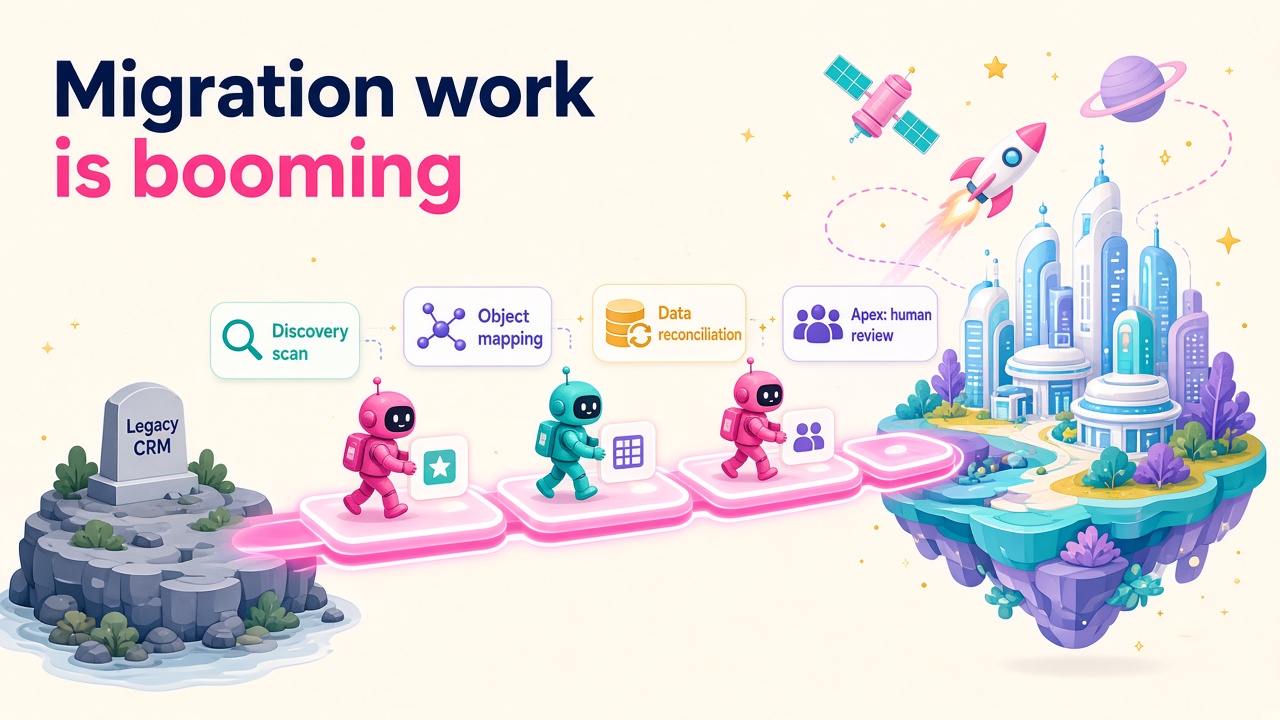
Dynamics 365 Activate launched in public preview on 9 September 2026. It uses AI to scan an existing Salesforce org, work out what is in it, recommend what should move, build the target schema in Dataverse and then migrate and reconcile the data. On 5 November, Bryan Goode, Microsoft's Corporate VP of Business Applications and Agents, told CX Foundation that demand has been "strong" and that Microsoft plans to expand it to "finance, operations, supply chain, and, certainly, contact centers". He also said to stay tuned for Ignite, which kicks off on 17 November.
Some people will read that and worry that the migration consultant's job is being automated away. I read it the other way. When the cost and risk of switching drops, more companies switch, and every one of those projects still needs people who know what they are doing.
What does Dynamics 365 Activate actually do?
According to Microsoft's Salesforce migration overview, the preview covers five stages for moves into Dynamics 365 Sales and Customer Service:
- Discovery and assessment. It scans a Salesforce org and catalogues objects, fields, flows, Apex classes, Lightning pages, ISV packages, integrations, localisation settings and licences.
- Object and field mapping. It maps Salesforce objects to Dataverse tables, with prebuilt standard mappings for accounts, contacts, leads, opportunities, cases, case comments, entitlements, activities and knowledge articles.
- Schema creation. It creates the tables, columns, choice columns and relationships in Dynamics 365 based on those mappings.
- Data migration. It moves the records across with progress tracking, plus selected binary content such as Salesforce Files, ContentNotes, classic attachments, email attachments and supported record images.
- Reconciliation. It checks that record counts match between source and target.
The sign-up page goes further than a data mover. It talks about mapping future workflows to proven patterns in the Microsoft Business Process Catalog and says the tool is informed by FastTrack expertise and Success by Design practices. Microsoft's launch post is clear about the intent too: the goal "is not simply to recreate an organization's existing CRM in a new system", but to decide what to preserve, simplify or redesign.
That last point matters more than any of the automation.
What it does not do (and why that is your opportunity)
Here is the line in the documentation every CRM consultant should underline. Flows, Process Builder, workflow rules and Apex classes are "analyzed and assessed for migration effort, but aren't automatically converted or migrated".
So the tool does the counting, the mapping and the heavy lifting of records. It tells you how big the automation and code problem is. It does not solve it. Somebody still has to sit with the client, work out which of the client's workflow rules still matter, rebuild the important ones as Power Automate flows or Copilot Studio agents, and retire the rest.
There are other honest limits in the preview documentation too:
- It is a preview, so it is not meant for production use yet.
- Files that are too big for the target environment, or without a supported migrated parent record, are skipped and reported.
- Salesforce API rate limits can slow large migrations down.
- When you request access, the only region on offer at the moment is US, according to the setup guide.
None of that is a criticism. It is exactly what you would expect from an early release, and it tells you where the human work sits for the next couple of years.
Why the expansion is the real story
A Salesforce-to-Sales tool is useful. A tool that does the same for finance, operations, supply chain and contact centres changes the shape of the whole market.
Microsoft's September post already said "ERP capabilities will be coming later this year". Goode's comments in November add contact centres to the list, and the timing is interesting. CX Foundation quotes Metrigy research finding that only 31.5% of organisations using a cloud contact centre have no plans to replace their main provider. That leaves a lot of contact centres window shopping, and Microsoft would like them to window shop in its direction.
Think about what that means for demand. Every migration that used to be "too risky" or "too expensive to scope" gets a free, AI-generated assessment as its starting point. Sales cycles get shorter. More deals get signed. Partners who used to spend three weeks on discovery can get to a credible plan much faster, and spend that time on design instead.
I have watched this pattern play out in recruitment tech for decades. When you lower the friction of switching platforms, you don't get fewer projects. You get more of them, done faster, by people who know how to use the new tools.
Which D365 roles benefit most?
CRM functional consultants
Your value moves from "I will map your fields" to "I will tell you which half of your Salesforce org you can throw away". The assessment will hand you a catalogue of objects, flows and pages. The skill is turning that catalogue into a sensible future-state design using the Business Process Catalog and native Dynamics 365 features.
Power Platform and Copilot Studio developers
Every flow, Process Builder process, workflow rule and Apex class that the tool assesses but doesn't convert is a rebuild job. Some will become Power Automate flows, some plug-ins, and plenty will be better redesigned as agents. If you can read Apex and write for Dataverse, you are the person who closes the gap.
Data migration specialists
Reconciliation of record counts is a great start, but clients still need data quality checks, deduplication, ownership mapping and a cutover plan that doesn't fall over on a Monday morning. The tool speeds you up. It doesn't replace your judgement on what "good data" looks like for that business.
Solution architects and pre-sales
A faster, cheaper assessment means more opportunities reach the proposal stage. Pre-sales architects who can take an Activate assessment and turn it into a confident, well-priced statement of work will be in very high demand, especially once ERP and contact centre workloads arrive.
Contact centre specialists
If Goode's comments come true, Dynamics 365 Contact Center migrations are next. People who understand routing, voice, Copilot Studio and the existing contact centre platforms they're replacing will be very hard to find.
Salesforce professionals thinking about a move
If you know Salesforce inside out, this is a great time to learn Dynamics 365. Migration projects need people who can read the source system properly. Being bilingual in both platforms is a genuine edge, and it will show up in your day rate. Have a look at our salary data to see where Dynamics 365 CRM pay sits right now.
A practical plan for the next month
You don't need to wait for Ignite to get ahead of this. Here is what I would do:
- Read the documentation this week. Start with the Activate overview and the Salesforce migration overview. It is a short read and most consultants haven't done it yet.
- Request access if you can. The setup guide covers signing in with a Microsoft Entra work account and choosing Customer, Partner or Internal as your account type. If you work for a partner, ask whether your practice already has a workspace.
- Get hands on with a Salesforce developer org. Build a small, messy test org with custom objects, a few flows and a bit of Apex, then see what the assessment says about it. Nothing teaches you faster than watching a tool assess something you built.
- Brush up on the Business Process Catalog. The future-state design step leans on it, and it has grown a lot this year.
- Practise rebuilding Salesforce automation in Power Automate and Copilot Studio. Pick three common workflow rules and rebuild each one properly. Write up what you learned.
- Update your profile. "Salesforce to Dynamics 365 migration" is a phrase hiring managers will search for. If you have done one, say so clearly on your CV and LinkedIn.
- Watch Ignite on 17 November. Listen for ERP and contact centre migration news and anything that changes the preview's scope.
What does this mean for hiring?
For employers and partners, the message is simple. If Microsoft is investing in making it easier to move to Dynamics 365, the pipeline of migration projects should grow, and the bottleneck will be people, not tooling. The teams that win will be the ones with consultants who can take an AI assessment and run with it.
That is a lovely problem to have. It means the market for good Dynamics 365 people keeps growing, and the people who learn the new tools early get first pick of the work. If you're hiring for these skills, our employer pages are a good place to start, and you can browse experienced Dynamics 365 consultants who already have migrations under their belt.
What to do next
- Browse the latest Dynamics 365 jobs and look for migration, Salesforce and CRM transformation roles.
- Check current Dynamics 365 salaries so you know your worth before your next conversation.
- Explore the products and vendors in the Dynamics 365 ecosystem that support migration and data work.
- Request access to Dynamics 365 Activate and run it against a test org before Ignite.