Project Ops Approvals Agent: The Skill to Learn Now
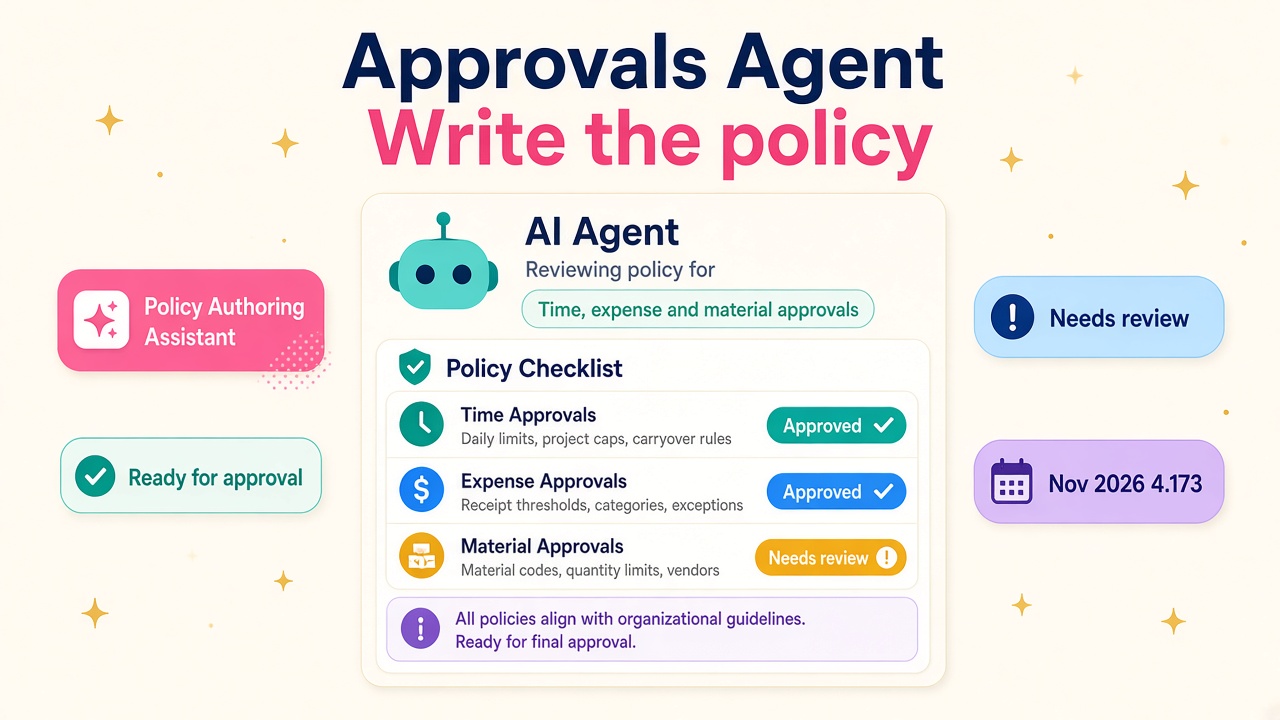
Project Ops Approvals Agent plus the Nov 2026 Policy Authoring Assistant: the policy-writing career skill that PO consultants need to learn now.
Project Operations consultants who still treat time and expense approval as a pure manual queue are about to feel the ground shift. Microsoft's Approvals feature of the Time and Expense Agent is a production-ready preview that does the first pass on time, expense and material entries against uploaded policy documents. The November 2026 Project Operations release adds the Policy Authoring Assistant on top: an agent that reviews a policy document and gives feedback on changes that raise the accuracy and reliability of the Activity Approvals Agent.
I have watched PSA and Project Operations skills go from "nice to have" to "put it on the CV" more than once. This one is different. It is not another form tweak. It is a policy-writing and agent-configuration skill that sits between delivery, finance controls and Copilot Studio. Partners who can design clear numbered rules, test Classify mode properly, and coach clients through auto-approve will look sharper than people who only know how to click Approve.
What the Approvals Agent actually does
According to Microsoft's Approvals Agent overview, a Copilot Studio agent does the initial review of incoming time, expense and material entries against the policy documents you upload for each entry type. Records that meet the criteria are marked Ready for approval. Records that violate a rule are marked Needs review. The idea is simple: cut the volume of mistaken approvals and the invoice corrections that follow.
An admin enables the feature with the Dynamics 365 Agent Deployment Tool or wizard, then turns on Enable Time and Expense Agent on Project Parameters. After that, a Time and Expense Agent tab appears on Project Parameters for org-wide policy documents. Projects can carry their own time, expense or material policy documents, and those override the org-wide ones for that entry type. If there is no policy for a record type, the agent does not classify those records at all.
Two modes matter in day-to-day work:
- Classify – the agent labels Ready for approval, but the project manager still approves manually.
- Classify and auto approve – Ready records are approved by the agent. Microsoft is clear: test thoroughly before you use this mode.
You also control scope. Each project has a "Use approvals agent to review entries" flag. "Automatically use approvals agent for new projects" on Project Parameters sets the default for new projects. That is how you pilot on a handful of engagements instead of flipping the whole tenant overnight.
On reviewed records, managers can Approve, Reject with a comment, or Reassign to Agent after a policy update so the same entry is re-evaluated against the new rules.
Why policy quality is the real skill
Microsoft's policy document guidance is blunt: accuracy depends heavily on how you write the policies. Separate documents for time, expense and materials. Numbered lists of clear, unambiguous rules. A violation sends the record to Needs review.
Ambiguous or conflicting rules confuse the agent. That is not marketing language; it is in the Responsible AI FAQ. The agent uses business logic plus large language models. Low risk becomes Ready for approval. High risk becomes Needs review with a justification. Mitigations Microsoft calls out:
- Test in Copilot Studio first with the policy you intend to use.
- Refine the language until the review status and justification match what you expect.
- Avoid conflicting policies.
- Stay in Classify mode while you configure, so Ready records are not auto-approved by accident.
The agent only sees a predefined data set for each entry type. For time, that includes hours, billable hours, rates, NTE validation, billing type, task, role, budgets, overtime flags and more. For expenses, receipt presence and category rules sit alongside cost and billing signals. Materials get product, write-in and budget checks. If you need data outside that set, you customise the trigger flow. Consultants who can map "what the business wants to enforce" onto "what the agent can actually see" will save clients weeks of false confidence.
The November 2026 Policy Authoring Assistant
Writing those numbered rules by hand is exactly where most projects stall. The November 2026 release for both Project Operations Integrated with ERP and Project Operations Core introduces the Policy Authoring Assistant: an agent that reviews a policy document and provides feedback on changes that help increase the accuracy and reliability of the Activity Approvals Agent.
Versions to know: Dataverse Project Operations 4.173.1.38. For Integrated with ERP, Finance project management and accounting 10.0.49. From 4.173 onwards, Microsoft also changed version numbering: controlled build plus increasing revision (for example 4.173.1.38) instead of date-based builds. That only affects numbering, not functionality, but it will show up in every ALM conversation this winter.
If Approvals Agent is the engine, Policy Authoring Assistant is the coaching layer. The career skill is not "I turned the feature on". It is "I can take a client's messy travel and time rules, turn them into unambiguous numbered policies, run them through the authoring assistant, test Classify mode in Copilot Studio, then decide with the client when auto-approve is safe".
Worth knowing in the same November release
Keep the thesis on Approvals, but PO consultants should also clock these UX items from the same drop:
- Task grid full screen mode for large schedules
- Calendar control upgrade to V2 for accessibility across project, resource and template calendars
- Team member grid upgrade to OneGrid
- Weekly Time Entry Notes preview, so Description and External Comment can be edited across a week's entries
None of those replace the Approvals skill, but they are useful talking points in demos and upgrade workshops.
What this does to Project Operations careers
Functional PO and PSA consultants who can draft time, expense and material policies, explain Classify versus auto-approve, and run a safe pilot will own a large share of 2027 upgrade work. Clients do not want another queue; they want fewer invoice corrections.
Solution architects own the org-wide versus project-level policy model, the project flag defaults, and the customisation boundary when the predefined data set is not enough. That is architecture, not configuration theatre.
Copilot Studio specialists who already deploy Dynamics 365 agents will pair naturally with PO delivery. The Approvals feature is a Copilot Studio agent. People who can test prompts and policies in Studio before production will get pulled into PO deals.
Finance and PMO stakeholders care about NTE, budgets, receipts and billable flags. Consultants who can translate those controls into numbered rules the agent can evaluate will sit closer to the commercial conversation.
Partners and ISVs can productise this: Approvals Agent enablement pack, sample policies for time and expense, Policy Authoring Assistant review workshop, Classify-mode pilot runbook. List that offer on our vendors directory once you can deliver it. Related catalogue items sit on products.
People hiring should look for candidates who have shipped Project Operations and can show a policy document, a Classify-mode test, and a clear story on when not to auto-approve. Our jobs board and salary data already reward PO and PSA fluency; agent-policy literacy is the next filter. If you are building a 2027 delivery team, post the role with Approvals Agent, policy authoring or Time and Expense Agent in the brief.
A realistic two-week practice plan
You do not need a production tenant to start learning the shape of the work.
- Day 1-2: Read the Approvals Agent overview, the policy document guide and the Responsible AI FAQ. Write the Classify versus auto-approve trade-off in your own words.
- Day 3-4: Draft a short time policy and a short expense policy as numbered rules. Deliberately include one ambiguous line, then rewrite it until a colleague cannot misread it.
- Day 5-6: Map each rule to the predefined data signals Microsoft documents (hours, NTE, billing type, task, receipt presence, budgets). Cross out any rule the agent cannot see without customisation.
- Day 7-8: In a sandbox, follow the Agent Deployment Tool path, enable Time and Expense Agent on Project Parameters, upload org-wide policies, and leave the mode on Classify.
- Day 9-10: Submit a handful of clean and dirty time and expense entries. Compare Ready for approval versus Needs review against your expectations. Use Reassign to Agent after a policy tweak.
- Day 11-12: On 4.173.1.38 (Core or Integrated), try the Policy Authoring Assistant against your draft. Capture the feedback and revise. Note the Finance 10.0.49 companion version if you are on Integrated.
- Day 13-14: Write a one-page pilot plan for a real client: which projects, which entry types, who reviews Needs review, when you would consider auto-approve. Scan jobs and salaries, and decide whether you list the offer on vendors.
What to do next
- Read Microsoft's Approvals Agent overview and policy document guidance end to end, then draft one time and one expense policy as numbered rules.
- Stay in Classify mode while you configure; only discuss auto-approve after thorough testing in Copilot Studio.
- On the November 2026 builds (Dataverse Project Operations 4.173.1.38, and Finance 10.0.49 for Integrated), use the Policy Authoring Assistant to review those drafts before you call them production-ready.
- Put org-wide versus project-level policies, project flags and the "no policy means no classification" rule into your next client workshop deck.
- Browse Project Operations roles, check pay on salaries, list delivery capability on vendors, explore related products, or hire people who already speak Approvals Agent and policy authoring.
The queue is not going away overnight. The people who can teach the agent what "good" looks like will own the next wave of Project Operations delivery.