D365 F&O Holiday Freeze: The Release Skill Admins Need
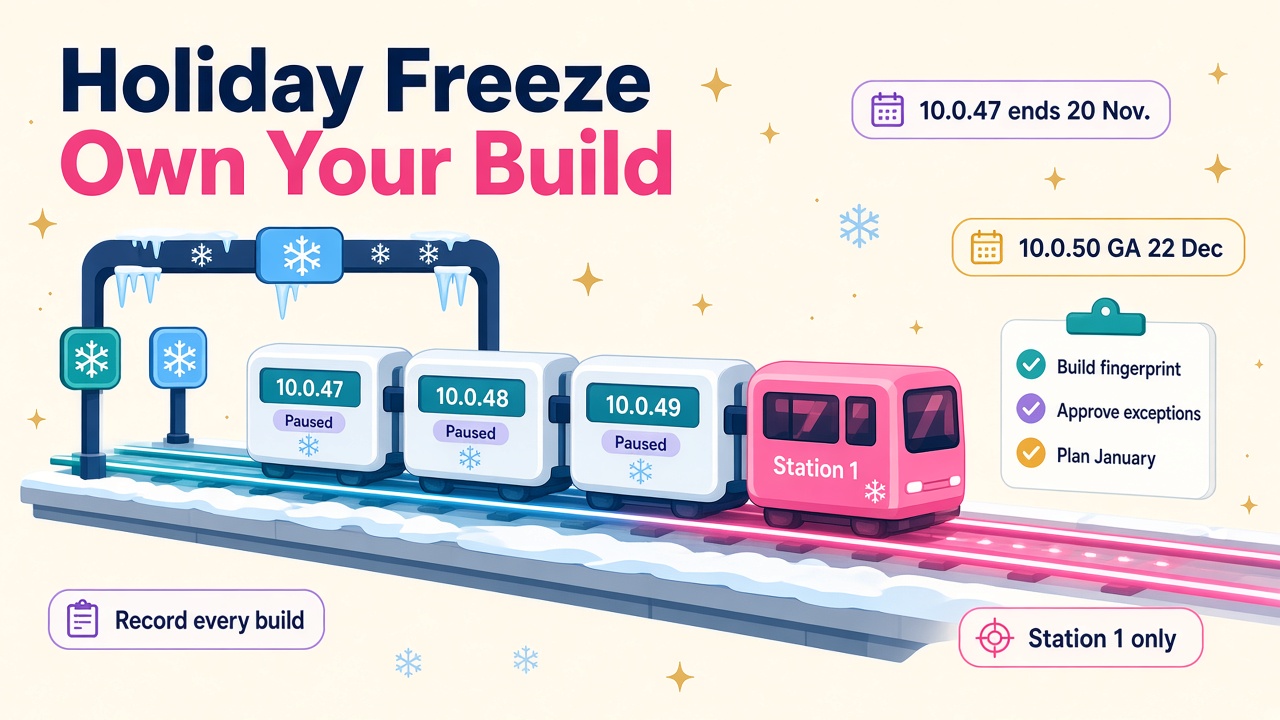
Microsoft has paused wider PQU rollouts for the F&O holiday freeze and 10.0.47 ends on 20 November. Here is how D365 pros can own their builds through January.
If you look after a Dynamics 365 Finance and Operations estate, the next eight weeks are quieter than usual on paper and busier than usual in practice. Microsoft has switched on its holiday deployment freeze for proactive quality updates (PQUs), version 10.0.47 reaches end of service this Friday, and 10.0.50 lands for self-update just before Christmas.
None of that is bad news. A freeze is Microsoft giving finance teams a calm year end, and I think that is exactly right. But it does mean the people running F&O environments have more decisions to make for themselves, and the consultants and admins who handle it well are going to look very good in January.
What has Microsoft actually changed?
On the PQU release schedule on Microsoft Learn, a run of trains is now marked Canceled*. The footnote is the important bit: the PQU still happens on Station 1, releases for every other station have been cancelled because of the holiday deployment freeze, and the build stays available for manual uptake.
As I write, the affected trains are:
- 10.0.47: PQU-16 (starting 4 November) and PQU-17 (starting 25 November).
- 10.0.48: PQU-10 to PQU-13, with starts from 11 November to 23 December.
- 10.0.49: PQU-3 to PQU-7, with starts from 4 November to 30 December.
Normal service picks up again in the new year, with 10.0.48 PQU-14 starting on 6 January 2027 and 10.0.49 PQU-8 on 13 January 2027.
So the default for most production environments is simple: nothing new arrives automatically until January. The builds still exist, though, and anyone with access to Lifecycle Services can pull one in.
Why 10.0.47 makes this week urgent
The service update availability table shows 10.0.47 reaching end of service on 20 November 2026. After that date, no new cumulative updates are provided for it. If you have any environment still sitting on 10.0.47, it is about to spend the whole holiday period on a version that no longer gets fixes.
Here is the rest of the calendar worth pinning to your wall:
| Version | Key date |
|---|---|
| 10.0.47 | End of service 20 November 2026 |
| 10.0.48 | End of service 16 February 2027 |
| 10.0.49 | End of service 21 May 2027 |
| 10.0.50 | Latest possible preview update 17 November 2026, self-update GA 22 December 2026, first autoupdate 31 January 2027, second 28 February 2027 |
Microsoft ships four service updates a year, you can pause at most one in a row, and you have to take at least two a year. The sandbox autoupdate runs seven days before production. Put those rules next to the freeze and you can see the squeeze coming: lots of teams will hit late January with a 10.0.50 autoupdate on the way and very little regression time booked over the break.
I covered what is inside 10.0.50 for finance teams in D365 Finance 10.0.50: The Year-End Skills Finance Pros Need. This post is about the plumbing that gets you there safely.
Three release paths, one estate
The clearest write-up I have seen on this comes from Mamdouh Ibrahim at Beyond ERP. His point is that during the freeze a single estate can end up on three paths at once:
- Hold. Production stays on its approved baseline.
- Station 1. An opted-in sandbox keeps getting the new builds and gives you early evidence.
- Manual installation. Someone pulls a newer PQU into an environment to fix a real defect or meet a regulatory need.
Each of those is perfectly sensible on its own. The trouble starts when nobody writes down which environment is on which build. A defect found in a sandbox on a newer PQU may not reproduce in production. A partner or ISV trying to help you needs the exact build, and "we're on 10.0.48" is no longer enough when two environments on 10.0.48 are running different PQUs.
Beyond ERP also points to Microsoft's guidance that an applied PQU cannot be rolled back. That one line should shape every decision you make over the break. If you install it, your way back is a supported restore or a replacement environment, not an uninstall button.
The skill: owning your build fingerprint
This is the bit I would encourage every F&O admin, technical consultant and release manager to get properly good at. For each environment, keep a short record of:
- Application build and platform build (Microsoft publishes both for every active train, along with the Unified Environment Provisioning version).
- Environment purpose and which station it sits in.
- Deployed packages and extension versions.
- When it was last updated, and whether that was automatic or manual.
- The regression evidence for that build.
- Who approved any change, and why.
- The build you plan to land on after the freeze.
It sounds like admin. It is admin. It is also the difference between a support ticket that gets solved in a day and one that bounces around for a fortnight while three teams argue about which build they are looking at.
The station mapping matters here too. On Microsoft's schedule, Station 3 includes UK South, Australia East and Australia South East, Station 4 includes UK West, North Europe and East US, and Station 5 covers West Europe, Central US and West US. Production and tier-4 and tier-5 sandboxes get PQUs on weekends. If you run a multi-region estate, your environments do not all move on the same day even in a normal month, so the record is worth keeping long after January.
When is a manual update worth it?
Sometimes it is. A warehouse execution bug in peak season or a regulatory fix you cannot wait on are good reasons to pull a build in. Beyond ERP suggests five things to capture before you approve one, and I think they are spot on:
- Reason. What business, regulatory or service risk justifies changing things now?
- Scope. Which environments get the build, and which stay on hold?
- Evidence. Which finance, supply chain, integration, reporting, batch and agent tests have to pass?
- Recovery. What is the restore or replacement route if it goes wrong?
- Convergence. Which common build will every branch return to, and what regression needs repeating before they merge?
My own rule of thumb is that if you cannot fill in the recovery line in under five minutes, you are not ready to install.
Don't forget your agents
This is the 2026 twist. More and more F&O environments now have agents and Copilot tools reading and writing data through the Dynamics 365 ERP MCP server. Beyond ERP makes the point that these belong in your compatibility testing too: check the data, form and action tools, the metadata and permissions, and a few controlled read and write operations, and note the exact build you tested on.
I love this. It means the release management skill set is growing up alongside the AI work rather than being left behind by it. The person who can say "our reconciliation agent was tested on application build 10.0.2645.169 and here is the evidence" is going to be very employable.
Use the quiet weeks well
The glass-half-full view of a freeze is that it hands you time. Fewer surprise updates means you can do the groundwork you never get round to in a busy month:
- Get a 10.0.50 sandbox up and start regression testing now, rather than in the last week of January.
- Tidy up your Regression suite automation tool (RSAT) test plans, which Microsoft recommends for service update testing.
- Review your update settings in Lifecycle Services and check whether you are using your one allowed pause wisely.
- Write down your post-freeze target build for every environment.
- Agree who approves exceptions over Christmas, including cover when people are on leave.
None of this needs a big project. Most of it is an afternoon with a spreadsheet and the right people in the room.
What it means for D365 careers
Release and environment management used to be the job someone did on the side. With continuous updates, PQU trains, Station 1 testing and now agents plugged straight into ERP data, it is turning into a real specialism. Employers want technical consultants, solution architects and F&O admins who can talk confidently about builds, stations, regression evidence and rollback plans, and who can explain the trade-offs to a finance director in plain English.
If that is you, say so on your CV and in interviews, with specifics. "Managed holiday freeze release paths across a multi-region F&O estate, including manual PQU uptake with documented recovery and convergence" reads very differently from "supported upgrades". You can see the kind of roles asking for these skills on our D365 jobs board, and how they are paid on our D365 salary pages.
What to do next
- Before 20 November: check every environment for 10.0.47 and plan its move to a supported version.
- This week: capture a build fingerprint for each environment and agree your Station 1 and manual update rules.
- Before Christmas: spin up a 10.0.50 sandbox once self-update opens on 22 December and book regression time for early January.
- If you need help: browse experienced D365 consultants or D365 partners and vendors who do release management, and look at testing and monitoring tools in our product directory.
- If you are hiring: post your role on D365 Market through our employers page and be specific about release and environment skills.
Handle the freeze well and January becomes a smooth step up to 10.0.50 instead of a scramble.