Customer Service Email Resolution: The Skill D365 Pros Need
D365 Customer Service can now answer customer emails autonomously via the Case Management Agent. Here is what shipped and the skills D365 pros need now.
If you work in Dynamics 365 Customer Service, the humble support inbox has just become one of the most interesting places in the whole stack.
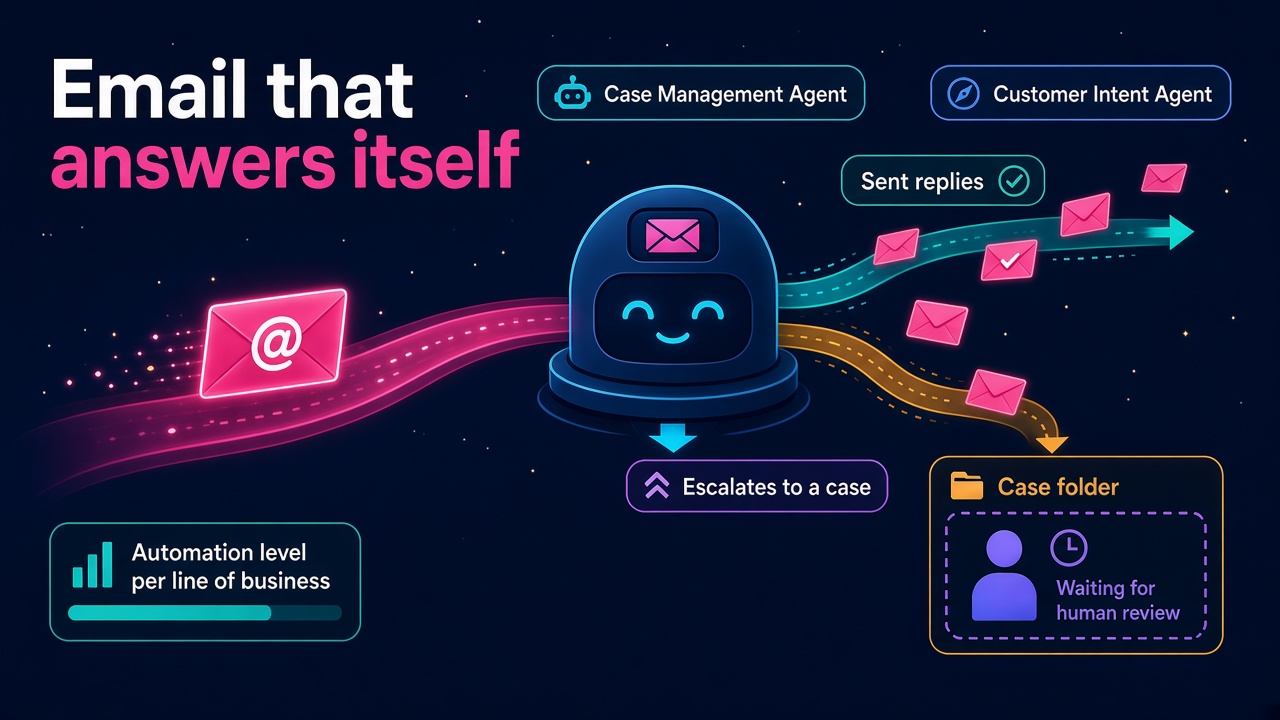
Microsoft has put autonomous email resolution into Customer Service through the Case Management Agent. The Message Center post (RM578064, published 23 October 2026) describes it as "end-to-end handling of customer emails without manual intervention or default case creation". An email comes in, the system works out what the customer actually wants, builds an answer from your knowledge and business rules, and sends it. If it can't fix the problem, it creates a case with the full context attached so a person can pick it up without starting again.
That is a big change to a pattern most of us have lived with for twenty years: every email becomes a case, every case lands in a queue, and someone works the queue. I am quite certain this is good news for D365 people, but only for the ones who learn how to set it up, govern it and prove it works.
What has actually shipped?
Here is what the official sources say, without the marketing gloss.
- Autonomous email resolution (RM578064). Delivered through the Case Management Agent. The roadmap entry lists preview from June 2026 and general availability in September 2026. Worth knowing: the Microsoft Learn setup page still labels email resolution a "production-ready preview" with supplemental terms, so check the status in your own tenant before you promise a client anything.
- Automation level per line of business. Admins choose how far the agent goes for each line of business, from fully autonomous replies through to drafting a response for a service representative to review and send.
- Email classification (RM576775, GA August 2026). Admins define their own taxonomy of categories and subcategories. AI reads the subject and body and stamps a category on the email record, which the Case Management Agent, automatic record creation rules, Power Automate flows and reporting can all use. It can be limited to specific mailboxes, sender domains or languages.
- Next best actions with Customer Intent Agent (RM577819, GA August 2026). For the emails that do reach a human, the Copilot pane now offers one-click actions such as drafting emails, updating knowledge articles and updating case notes, with suggested articles to explain the reasoning.
- Intraday Agent (RM577184, in development, preview September 2026, GA March 2027). An autonomous workforce agent that watches queue volumes against forecast, reforecasts in real time, and can reschedule breaks, extend shifts or move representatives between channels to protect service levels.
Put those together and you can see where Microsoft is taking service: AI handles the routine volume, humans handle the tricky stuff, and another agent keeps the staffing in shape around both.
How does email resolution work under the bonnet?
The Learn documentation is refreshingly specific, and it tells you exactly which skills you need.
The prerequisites are:
- Data movement across regions set up in the Power Platform admin center (yes, the same Copilot admin setting we wrote about in Move Data Across Regions).
- A Power Platform pay-as-you-go plan linked to an Azure subscription, because the agent is charged when it runs.
- Customer Intent Agent configured.
- The guided setup for the Case Management Agent completed.
- For the fully autonomous flow, an application user and a shared mailbox.
Then, in Copilot Service admin center, you turn on email resolution under Email settings, pick the application user that replies and creates cases, set deployment status for each line of business, optionally use a Copilot-recommended email template, and choose a single language for all emails.
At runtime, it only kicks in when an incoming email matches the email rules for a line of business in Customer Intent Agent. It uses Customer Intent Agent to identify intent, uses case resolution capabilities and your knowledge to build the answer, sends it if you've allowed that, and creates a case if the issue isn't resolved.
Look at that list again. Data residency, consumption billing, intent design, knowledge quality, mailbox and identity setup, and per-line-of-business rollout. None of that is "turn on the AI". It is proper consulting work.
Why this is good news for your career
Some people will read "without manual intervention" and worry about jobs. I'd look at it the other way round.
Every service organisation running Dynamics 365 has an inbox full of password resets, delivery questions, invoice copies and "where is my order" emails. Most of them would love to stop paying people to copy and paste the same answers. Now there is a supported, first-party way to do it inside the platform they already own. That creates demand for people who can design it, switch it on safely and show the results.
Here is the work I expect to see:
- Intent and taxonomy design. Someone has to sit with the service team, pull a few hundred real emails and design the categories, subcategories and intents that drive everything else. Get this wrong and the agent confidently answers the wrong question.
- Knowledge clean-up. The agent answers from enterprise knowledge. If your knowledge base is three years stale, it will be three years stale at scale. Knowledge managers and content designers just became much more valuable.
- Governance and rollout plans. Clients will want a staged approach: draft-for-review on one line of business, measure, then go autonomous on the safest categories. That is a change management and testing job.
- Cost modelling. Pay-as-you-go billing means finance will ask what it costs per resolved email. Consultants who can model consumption against handling time will win the business case.
- Reporting. Leaders will want to know how many emails were resolved without a case, how many escalated and whether customer satisfaction held up. That is Power BI and analytics work sitting right next to the agent.
- Workforce planning. As routine volume drops and the Intraday Agent arrives, workforce engagement management skills matter more, not less. Fewer, harder conversations need the right people at the right time.
If you're a Customer Service functional consultant, this is your chance to move from configuring queues to designing AI-assisted service. If you're a developer, connectors and custom agents feed the resolution, so there is plenty to build. If you're a service manager, understanding this well makes you the person who sets the rules rather than the person who has them set for them.
What will employers and hiring managers ask for?
Job ads tend to lag the technology by a few months, but you can already see the shape of it. Expect to see phrases like these in Customer Service and Contact Center roles over the next year:
- Case Management Agent and Customer Intent Agent configuration
- Copilot Service admin center experience
- Email-to-case redesign or "case-less" email handling
- Knowledge management for AI agents
- Copilot Studio and custom agent extensions
- Power Platform pay-as-you-go and Copilot credit governance
- Service analytics and Power BI
If you're hiring, the honest advice is that very few people have production experience with this yet. Look for strong Customer Service consultants who can show they've been hands-on in a sandbox, and who talk about intent, knowledge and governance rather than just the toggle. You can find D365 people with service experience on our consultants directory, and post roles on the employers page.
A realistic view of the risks
I'm optimistic, but let's not be daft about it.
An agent that sends email on your company's behalf is a brand and compliance risk if it's set up badly. The good news is that Microsoft has built in the controls you need: per line of business automation levels, a review-and-send mode, a single configured language and a case created with full context when the agent can't help. Use them. Start with draft-for-review, look at the results every day for a couple of weeks, and only move a category to fully autonomous when you'd be happy for your best representative's name to be on every reply.
Also remember the preview label on the Learn page. Production-ready previews come with supplemental terms. For regulated industries, get the legal and data protection people in early rather than late.
A one-week plan to get hands-on
You don't need a client project to start learning this. Here's a plan you could do in a trial or sandbox environment:
- Day 1: Read the email resolution setup guide and the Case Management Agent setup. Note every prerequisite and who in a real organisation would own it.
- Day 2: Set up email classification. Invent a simple taxonomy for a pretend business (billing, delivery, returns, account access) and send yourself 30 test emails.
- Day 3: Configure Customer Intent Agent and map intents to your categories. See which emails it gets right and which it fumbles.
- Day 4: Write five solid knowledge articles and turn on email resolution in draft-for-review mode for one line of business.
- Day 5: Review every draft. Tighten the knowledge and the business instructions. Try the next best actions in the Copilot pane on the escalated cases.
- Days 6 and 7: Write a one-page rollout plan: which categories go autonomous first, how you'd measure success, and what it might cost on pay-as-you-go. That page is a brilliant thing to take into an interview.
What to do next
- Check your skills against the market on our D365 salaries page and see how Customer Service and Copilot experience is being paid.
- Browse current Dynamics 365 jobs and look for service roles mentioning Copilot, agents or email automation.
- If you're a partner or ISV building service add-ons, list them on our products and vendors pages.
- Add "Case Management Agent" and "Customer Intent Agent" to your profile once you've done real hands-on work, and be ready to talk through your rollout plan.
The support inbox is where a lot of companies will feel AI first. Be the person who makes it work properly.