Power BI Desktop for Apps: The Data Skill D365 Pros Need
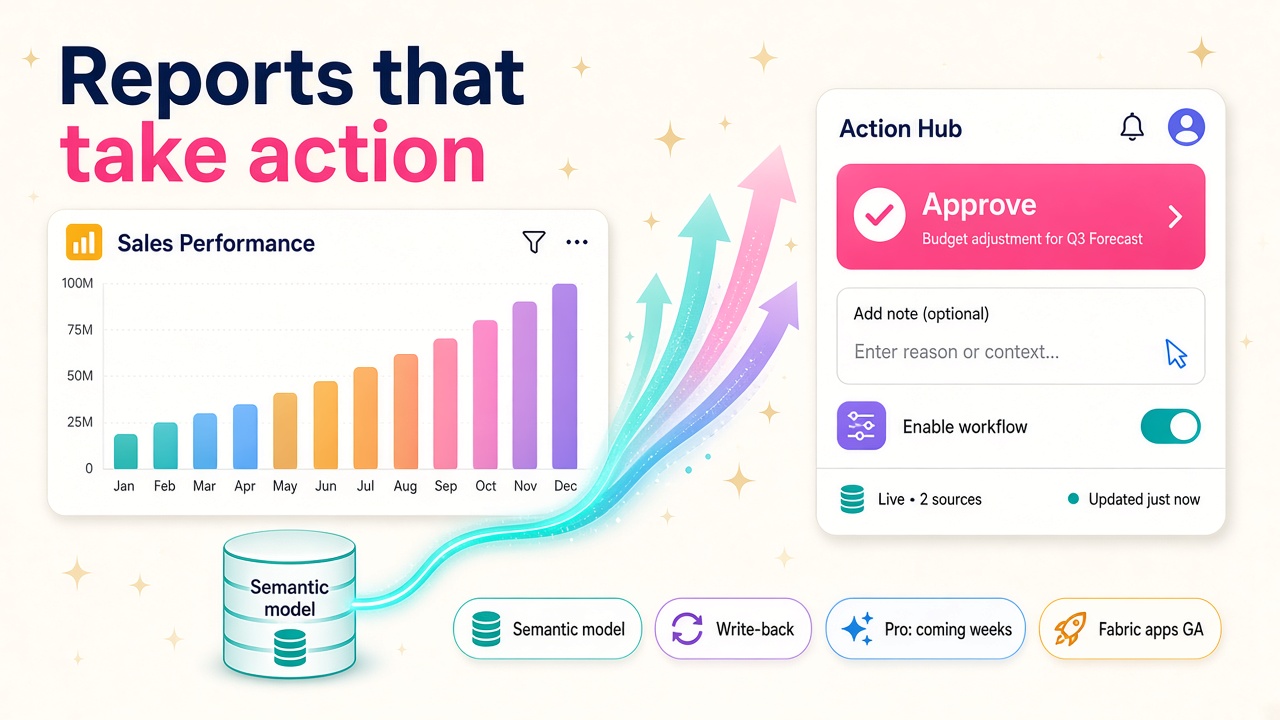
Power BI Desktop for Apps turns trusted semantic models into apps that take input and write back. Here's what D365 pros should learn now, and how to start.
Most Dynamics 365 projects end up in the same place. The ERP or CRM goes live, the data starts flowing, and within a month someone asks for "a Power BI report". Then a week later they ask why they can't just fix the number they are looking at, approve the thing in front of them or type in next quarter's target without leaving the report.
For years the honest answer was "you can't, not in Power BI". At Microsoft Ignite on 17 November 2026, that answer changed. Power BI Desktop for Apps is now in public preview, and it lets you build interactive apps on top of the semantic models you already trust. Apps that can take input, keep shared state and write changes back.
I think this is one of the most useful announcements of Ignite for anyone in the D365 world, and it has had far less airtime than the Copilot headlines. Here is what it is, why it matters for your career and what to do about it this week.
What did Microsoft actually announce?
There are a few moving parts, so it is worth being precise.
- Power BI Desktop for Apps (public preview). A separate application that launches from Power BI Desktop (New > Report app, or New report app on the Home ribbon). You pick a published semantic model, describe the app you want in plain English, and an agent builds it. You refine it through chat or direct edits, preview it locally and publish it to Microsoft Fabric. That is all straight from the Microsoft Learn overview.
- Power BI Pro access. According to the Ignite Book of News, Power BI Pro customers get custom data app creation in preview, including access to Fabric Database capabilities for apps that mix analytical and transactional work. Microsoft's Power BI team says Pro availability lands "in the coming weeks", with Premium Per User support in the months ahead.
- Fabric apps are generally available. The technology underneath, Fabric apps and the Rayfin developer toolkit, reached GA at Ignite. Microsoft says builders have created more than 100,000 apps with Rayfin since its preview launched.
- Semantic views (public preview). An open semantic layer based on the Apache Ossie standard, with measures written in DAX, so a metric is defined once and reused across reports, apps and AI.
Microsoft also says more than 22 million Power BI semantic models are used every day. That number is the real story. There is a colossal amount of trusted business logic sitting in those models, and a lot of it describes Dynamics 365 data.
Why is this a big deal for D365 people?
Because the gap between "insight" and "action" has always been where D365 projects leak value.
Think about the reports that get built on every Finance and Operations or Business Central rollout. Budget versus actual. Aged debt. Open purchase orders. Sales pipeline by region. People look at them, spot a problem, then go and do something about it somewhere else: an email, a spreadsheet, a Teams message, a journal in the ERP.
Microsoft's own examples for these apps are planning apps where people "enter targets, approve them, and comment in context", plus portals, approvals, tracking and data collection. Every one of those is a familiar request on a D365 project. The difference now is that a Power BI-savvy consultant can build a working version in an afternoon instead of quoting a custom development project.
I am quite certain this pushes the reporting role up the value chain. The person who used to be "the Power BI developer at the end of the project" becomes the person who builds the operational tools the business actually uses every day. That is a much better seat at the table.
What can't it do yet?
It is a preview, so go in with your eyes open. The Learn documentation is refreshingly candid about the limits right now:
- You need a GitHub Copilot licence and a GitHub sign-in, because GitHub Copilot does the app building.
- It doesn't create or modify semantic models. You need an existing model hosted in the Power BI service. Local models aren't supported.
- Publishing to Pro workspaces is "coming soon". For now you publish to a workspace on Fabric capacity.
- Write-back isn't supported in local preview, so test that properly once published.
- Projects can't live in OneDrive folders.
- App access and semantic model access are separate. Sharing an app doesn't grant access to its models, so you need to think about both sets of permissions.
There is also a sensible caution from Gregory Moureau at Illustrated that Fabric apps aren't available in every region. Check where your client's tenant sits before you promise anything.
None of this is a reason to wait. It is a reason to learn it on a sandbox now, so you are the one who knows the gotchas when clients start asking in the new year.
Which D365 roles benefit most?
Power BI and reporting consultants
This is your moment. You already understand semantic models, DAX, row-level security and the D365 data model. Adding "builds governed apps on top of them" to your profile is a short step with a big payoff. Look at the reporting roles on our jobs board and you'll see how often Power BI already sits alongside D365 in the requirements.
Functional consultants
Finance and supply chain consultants know the business process better than anyone. If you can describe the app well, the agent does a lot of the build. A functional consultant who can prototype a budget input app or a supplier scorecard with approvals during a workshop is going to win a lot of trust very quickly.
Power Platform developers
Don't panic, this doesn't replace Power Apps. Model-driven apps are still where transactional D365 processes live, and canvas apps still have their place. What changes is that you now have another option for analytics-heavy tools, and clients will want someone who can explain which one to use and why. That judgement is worth money, so keep an eye on our salary data for how blended skills are paying in your market.
Data and Fabric architects
Semantic views and Fabric apps GA make the semantic layer even more strategic. If your D365 data already lands in Fabric, you are the person who decides which definitions are trusted enough to build apps on. That is a governance job as much as a technical one.
Where does D365 data fit?
The whole thing starts with a semantic model, so the question for any D365 team is simple: how good are your models?
If your Dataverse or Finance and Operations data already flows into Fabric and sits under a clean, well-named semantic model, you are in a great position. If your reporting is a tangle of exported spreadsheets and one-off datasets, this is the nudge to fix it. An agent can only build a good app on a good model.
My advice is to pick one or two models that the business already trusts, the ones the CFO actually quotes in meetings, and treat them as the foundation for your first apps. Don't start with the messy stuff.
How do you get started this week?
Here is a practical list you can work through in a few evenings:
- Read the Learn overview and the set-up page for Power BI Desktop for Apps. Ten minutes, and you'll know the requirements.
- Sort your access. You need Power BI, a GitHub account and a GitHub Copilot licence. Use a Fabric trial or a sandbox workspace on Fabric capacity while Pro publishing is still coming.
- Pick a published semantic model you know well. A sales or finance model from a demo environment is perfect.
- Build something boring and useful. A target-setting app for sales managers, or an approval screen for budget changes. Describe who uses it, what they need to do and how it should look.
- Iterate in chat, then edit by hand. Notice where the agent gets it right and where you need to step in. That instinct is the skill clients will pay for.
- Publish and test permissions. Share it with a test user who has app access but not model access and see what happens. Then fix it.
- Write it up. A short LinkedIn post or internal demo showing a D365 report turned into a working app will do more for your profile than another certificate.
- Look at semantic views if you work in Fabric. Defining a metric once in DAX and reusing it across reports, apps and AI is exactly the kind of governance story D365 clients want to hear.
What should employers and partners do?
If you run a D365 practice, I'd get one or two people hands-on before Christmas. The Pro rollout means this lands in front of a huge base of existing Power BI customers, many of them running Business Central or Finance and Operations, and they will ask their partner first.
It is also a good time to rethink how you scope reporting work. Instead of a fixed number of reports at the end of a project, consider offering a small number of action-focused apps built on trusted models. It is a better outcome for the client and a more interesting job for your team. If you are hiring for this blend of skills, you can post a role or browse D365 consultants who already list Power BI and Fabric.
Vendors building D365 add-ons should take note too. If your product's value is mostly "a dashboard plus a form", the bar just moved. Have a look at the products and vendors in our directory to see who is already building on Fabric.
The bigger picture
I love this direction. For a long time, reporting was where data went to be looked at. Now the same trusted model can power reports, apps and AI agents, and the people who understand both the D365 business process and the data model sit right in the middle of it. That is a very good place to be heading into 2027.
It is early, it is a preview and there are rough edges. But the people who learn it now will be the ones running the workshops next year.
What to do next
- Read the Power BI Desktop for Apps overview and set up a sandbox this week.
- Build one small app on a D365 semantic model you trust, then share what you learned.
- Add Power BI apps and Fabric to your profile and browse the latest D365 jobs that ask for reporting skills.
- Check the salary guide to see what combined reporting and app skills are worth in your market.
- Employers: post a role for a D365 reporting consultant who can build as well as report.