Copilot Studio CLI: The Agent ALM Skill D365 Pros Need
Ignite 2026 lets you build Copilot Studio agents locally, keep them in GitHub and publish with a CLI. Here is why agent ALM is the next D365 skill to learn.
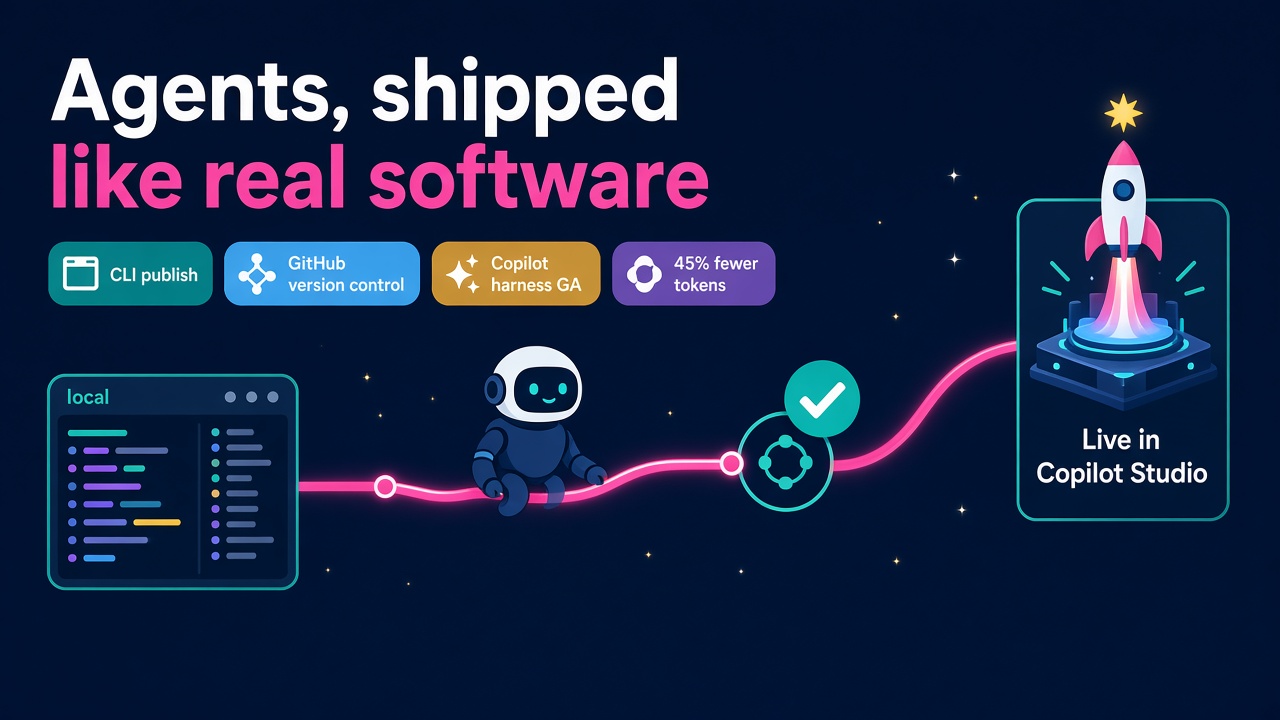
Microsoft Ignite 2026 kicked off on 17 November, and while most of the headlines went to Dynamics 365 moving inside Copilot, one of the most useful announcements for D365 professionals was tucked away in a Tech Community post about Copilot Managed Runtime. You can now build Copilot Studio agents and workflows locally, edit them in the developer tool of your choice, keep them in version control such as GitHub, and publish them back to Copilot Studio from the command line.
That sounds like a small developer convenience. It isn't. It is the moment agents start being treated like proper software, and that opens up a whole new line of work for D365 consultants, developers and Power Platform people who know how to do application lifecycle management (ALM) well.
I think this is one of the best career opportunities to come out of Ignite this year, so let's dig into what was actually announced, what is ready today and what you can do about it this month.
What did Microsoft actually announce?
Availability matters here, because "announced" and "available" are not the same thing. Here is the picture as Microsoft and the people reading the Book of News closely have described it.
- Copilot Managed Runtime is generally available and rolling out to tenants. It is Microsoft-operated hosting with Entra identity, governed data access and app lifecycle management for apps built in Copilot Code, Copilot Cowork, Copilot Studio, GitHub Copilot, VS Code and third-party tools (Microsoft Tech Community).
- Building Copilot Studio agents and workflows locally and publishing them with the CLI is in public preview. The Book of News calls it a "first iteration", so expect it to move quickly (Copilot Coaching recap).
- Code is Git-backed whichever tool you start in. Organisations on GitHub Enterprise can connect their own repositories, so apps follow the same branching, review and release practices as the rest of their software.
- Code Agents are in early-access preview, by application, for teams that want to author agents fully in code with a choice of model, orchestrator or harness.
- The new Microsoft Copilot harness for Copilot Studio is generally available. Microsoft's own evaluation says it lifted tasks with multiple tools from 87.0 to 98.9 percent and used 45 percent fewer input tokens per task than the Standard harness. Those are vendor numbers, so test them on your own agents.
- Agent 365 can now approve plugins and skills centrally (GA), with central management of MCP servers and Copilot Studio costs in Cost Management both in preview.
Qualcomm was quoted by Microsoft saying the CLI brings "code-first development to Copilot Studio" and supports "more mature ALM practices". That is a big enterprise saying out loud what a lot of us have been thinking for a while.
Why agent ALM is suddenly a real skill
For the last couple of years most Copilot Studio agents have been built the way early Power Apps were built: in a browser, by one enthusiastic person, with no history of who changed what. That is fine for a demo. It is not fine when an agent is reading customer records in Dynamics 365 Sales, raising purchase orders in Finance and Operations or answering cases in Customer Service.
Jon Russell put it well in his Ignite recap: agent instructions are effectively code now. A one-line change to an agent's instructions can change its behaviour more than a week of flow changes (Jon Does Flow). That deserves a diff, a pull request and a second pair of eyes.
Put that together with what else landed at Ignite and the shape of the work becomes obvious:
- Dynamics 365 Sales and ERP apps plugins for Copilot are generally available, so agents are now touching core business data every day.
- Work IQ is adding separate WorkIQ.Read and WorkIQ.Act permissions, action policies that can allow, block or require human approval, and a tenant-wide cap on agent actions (expanded controls in preview).
- Agent 365 is building an action centre to find inactive and ownerless agents, because Microsoft knows exactly how many of them are out there.
Every one of those things is easier to manage when the agent lives in a repository with a clear owner, a change history and a release process. The organisations that get this right will scale agents with confidence. The ones that don't will end up with a long tail of mystery agents nobody dares switch off.
Who should care about this?
D365 and Power Platform developers
This is your home turf. If you already know solutions, environment variables, Power Platform pipelines and Azure DevOps or GitHub Actions, you are most of the way there. The new bit is treating agent definitions, topics, instructions and workflows as first-class source files that get reviewed and promoted like any other code.
Functional consultants
Don't switch off because the word "CLI" appeared. Functional consultants write the instructions, define what the agent is allowed to do and decide which actions need approval. In a Git-based world, your instructions become a file that can be reviewed, tested and rolled back. Learning to work in that flow (even just reviewing pull requests in GitHub) will make you far more valuable on agent projects.
Solution architects and technical leads
Someone has to decide how this fits alongside existing solutions, environment strategy and pipelines. Microsoft hasn't fully spelled that out yet, which is exactly why clients will pay for people who can work it out sensibly. Russell's advice is sound: don't rip up your pipelines this week, try the local build and CLI publish route on one low-risk agent first.
Admins and governance leads
With Agent 365 approving plugins and skills centrally and Cost Management arriving in preview, admins become the people who connect the release process to the guardrails. Knowing which agent version is live, who approved it and what it costs each month is the kind of joined-up story CIOs want to hear.
What does good agent ALM look like?
Nobody has a perfect playbook yet, but the principles are the same ones we have used for D365 for years, applied to a new kind of artefact.
- One repository per agent or per agent family. Instructions, topics, workflows, test prompts and documentation all live together.
- Branches and pull requests for every change. Even small tweaks to instructions get reviewed by someone who understands the business process.
- An evaluation set in the repo. Twenty or thirty real conversations the agent must handle well, run before every release. Microsoft Foundry now has generally available multi-turn evaluation and an Agent Optimizer, but they are only as good as the evaluations you feed them.
- Separate dev, test and production environments. Exactly as you would for a D365 solution, with the CLI publishing to each in turn.
- Least privilege by default. Start every agent on read access, prove it is useful, then grant act permissions for specific actions with an approval step in front of the ones that matter.
- A named owner and a cost line. Every agent in the repo has a business owner and a budget, so it never ends up on the ownerless list.
None of this is glamorous, but it is the difference between an agent pilot and an agent programme. It is also exactly the kind of work that partners will be scoping into statements of work in 2027.
What does this mean for D365 careers and pay?
I am quite certain the next wave of D365 hiring won't just be "Copilot Studio maker" roles. It will be people who can build agents and run them safely at scale. Job titles will lag behind as they always do, so look for the skills inside the ads: Power Platform ALM, Azure DevOps, GitHub Actions, solution architecture, Copilot Studio and governance.
If you can show a client a working agent in GitHub with a pull request history, an evaluation set and a clean release into production, you are in a very small group right now. Small groups command better day rates. Have a look at current D365 and Power Platform jobs and the salary data to see where ALM and DevOps skills are already lifting pay.
For employers, the message is just as positive. You don't need a separate team of AI engineers to do this properly. Your existing D365 developers and Power Platform people already have most of the muscle memory. Give them the time to learn the CLI and the governance controls, and you will have agents you can actually trust. If you need extra hands, D365 consultants with DevOps backgrounds are a sensible place to start.
How to get started this month
Here is a practical list you can work through over the next few weeks:
- Read Microsoft's Copilot Managed Runtime announcement and the CLI getting-started page at aka.ms/msagent-cli.
- Pick one low-risk internal agent, such as an FAQ or internal policy agent, and pull it down locally.
- Put it in a GitHub repository, make a small change to its instructions on a branch, raise a pull request and publish it back with the CLI.
- Write ten to twenty test conversations and keep them in the same repository.
- Try the same agent on the Standard harness and the new Copilot harness, and compare answer quality and Copilot Credits used.
- List every action the agent takes and mark which ones should need human approval once Work IQ action policies are available to you.
- Talk to your admin team about Agent 365 plugin and skill approval so your release process and their governance process meet in the middle.
- Keep an eye on the products and vendors directories as ISVs start shipping ALM and testing tools for agents.
What to do next
Agents are growing up, and Ignite 2026 gave them the tools of grown-up software: local builds, Git, pull requests, a CLI, a better harness and central governance. That is great news for anyone in the Dynamics 365 world who already knows how to ship and support solutions properly.
- Professionals: spend a few evenings getting one agent into GitHub and through a CLI publish, then put it on your CV and LinkedIn. Browse D365 jobs to see who is already asking for Copilot Studio and ALM skills.
- Employers: make agent ALM part of your 2027 delivery standards now, and find the people who can lead it through D365 Market for employers.
- Everyone: test the vendor claims on your own agents, start small and build from there. The exponential age rewards the people who learn the new tools early, and this one is very learnable.