A Business Central app for automating document distribution with configurable email scenarios, PDF and XML format support, multi-recipient delivery, and document customization including overlays and general conditions.
Business Central
Product directory
17 email and productivity products for Dynamics 365 Business Central from 17 independent vendors.
email and productivity for Business Central
D365 Market lists 17 email and productivity apps for Business Central from 17 independent vendors, as of November 2026. Products with fuller listings appear first. The order is not a ranking of quality.
| Product | Vendor | Type | Pricing | Deployment |
|---|---|---|---|---|
| Powerblox Document Distribution | Powerblox | Native app | Free trial | Cloud, On-premises |
| Email720 | ON720.COM | Native app | Free, Usage based | Cloud |
| PMX Synact | PMX Dynamics | Native app | Free trial, Subscription | Cloud |
| Elevate Attachments | Equerra Limited | Native app | Subscription | Cloud |
| VisualSP | VisualSP | Native app | Free, Free trial, Subscription | Cloud, Hybrid |
| Document Mail Queue | Apportunix | Native app | Free trial, Subscription | Cloud, On-premises |
| Acumens e-Mailing | SBC Dynamics ERP | Native app | Quote on request, Subscription | Cloud, On-premises |
| SD Document Sender | Simply Dynamics | Native app | Subscription | Cloud |
| NB Scheduler | Cetas Information Technology | Native app | Quote on request | Cloud |
| SendGrid Connector for Business Central | BC Wizards | Native app | Subscription | Cloud |
A Business Central app for automating document distribution with configurable email scenarios, PDF and XML format support, multi-recipient delivery, and document customization including overlays and general conditions.
Certified app built inside Microsoft Dynamics 365 Business Central for sending sales documents by email. It improves delivery rates, makes it easy to customise email templates and tracks whether each document was delivered. Part of the ON720 app family, free to get started.
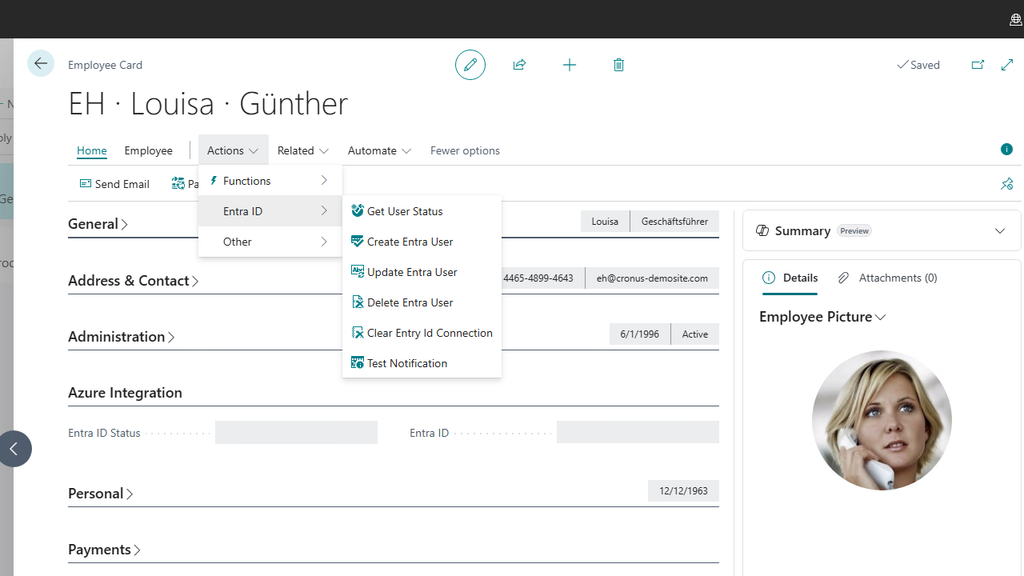
PMX Synact from PMX Dynamics is a Microsoft Azure toolbox app for Microsoft Dynamics 365 Business Central that handles the communication layer between Business Central and Azure, from authentication to full logging. Out of the box it creates and synchronises Entra ID users with Business Central employees and contacts, syncs Outlook calendar entries with service or CRM resources and stores documents in SharePoint linked to Business Central records, and partners can build their own Azure customisations on it without rebuilding the connection each time.
Business Central extension that allows multiple document attachments to be bundled and sent with outgoing emails, supporting attachment groups, report layout attachments, file uploads, and dynamic attachment generation from Business Central tables.
Microsoft-native Digital Adoption Platform for Dynamics 365 providing role-based, in-app guidance and training to drive user adoption. Deploys as a managed solution without browser extensions and supports the entire Dynamics 365 family including Sales, Field Service, Customer Service, Marketing, Finance, Supply Chain, Commerce, Human Resources, Project Operations, and Business Central.

Business Central AppSource extension that queues and batch-sends posted sales/purchase documents by email on a schedule—automatic enqueue after posting, attachments, status tracking and sending log, processed via Job Queue without interrupting users.

Native Dynamics 365 Business Central emailing extension that sends emails from customizable templates across sales and purchase documents, posted documents, reminders, finance charge memos and customer statements. Users define e-Mail Cards to control how each document type is generated and sent, including individual or batch customer statements.

SD Document Sender from Simply Dynamics is a Microsoft Dynamics 365 Business Central app for automated or manual distribution of standard documents. It schedules batch sending by email, print, Azure Blob Storage or FTP/SFTP, supports rich HTML email templates with document placeholders, consolidates multiple documents into one email per account, attaches scheduled promotional files, and keeps a full history of every send for audit. It supports Essential and Premium editions.

Report scheduling add-on for Microsoft Dynamics 365 Business Central. It automates recurring report runs daily, weekly, monthly or at custom intervals, emails them to internal users, user groups or external recipients in Word, Excel or PDF, and logs every scheduled run for delivery tracking, troubleshooting and audit.
A Business Central extension enabling transactional and marketing email delivery through SendGrid directly from BC, eliminating SMTP workarounds. Tracks delivery, open, and bounce events. Microsoft AppSource certified.

Document delivery app for Dynamics 365 Business Central that emails batches of personalized sales orders, invoices, statements and reminders as a background task, with flexible delivery rules, dynamic attachments, consolidated documents, email templates and scheduled sending.

Business Central extension for rich HTML pop-up notes on customers, vendors, items, sales/purchase docs and production orders, plus event-driven alerts (credit limit, job queue failure, etc.) and ad-hoc user/group tagging with emailed links back into BC.
Native Dynamics 365 Business Central no-code email automation that sends personalized, data-driven emails (order confirmations, invoices, payment reminders, approvals, alerts) triggered by BC data changes. Includes the full Business Rules engine (10 action types), email templates, real-time delivery tracking and audit trail, and works with standard, ISV and custom BC tables without coding.
Native Dynamics 365 Business Central AI agent that extends Microsoft’s Sales Order Copilot Agent for subscription-centric selling. Interprets inbound customer emails to create quotes/orders, converts them into new or changed LISA Business subscriptions/contracts (add/remove lines, pro-rata credits, future-dated cancellations), with controlled auto-invoicing and full audit trail.

AI-powered in-app assistant that provides context-aware guidance and answers to Business Central questions without leaving the application, available 24/7.

Automation app for Business Central that sends customer statements and invoices via email based on schedules or posting events. Supports customizable email templates, job queue scheduling, and reduces manual email communication tasks.
Extends Business Central's email functionality to add CC and BCC recipients directly to sales and purchasing documents, ensuring key stakeholders are automatically copied on quotes, orders, invoices, and purchase documents.
Email and productivity products connect Microsoft Dynamics 365 to Outlook, Teams and the tools where daily work happens. They track correspondence against ERP and CRM records, generate documents and messages from Dynamics data, and cut the copy-paste between systems. Teams use them to keep the system of record complete without extra admin.
Company logos provided by Logo.dev